Acadamio

Resources >

AI and Automation Use Cases for Business

Practical ways to reduce manual work, speed up operations and build more reliable workflows across business functions.

Benefits of AI and business process automation

Generative AI and automation can help teams reduce repetitive work and make information easier to use. The value depends on the process, the quality of the inputs and the checks built into the workflow.

Improve productivity

  1. Speed up routine processes: automate repetitive tasks so teams can focus on work requiring judgement.
  2. Support consistent output: use defined formats and validation to reduce avoidable errors.
  3. Support decisions: prepare summaries and analysis for people to review.
  4. Use resources effectively: spend less time moving information between systems.

Reduce operational effort

  1. Reduce manual processing: spend less time on repeated administrative work.
  2. Improve workflows: identify bottlenecks and unnecessary steps.
  3. Reduce rework: detect incomplete data and route exceptions for review.
  4. Handle more volume: scale supported workflows while monitoring quality and costs.

AI automation use cases at a glance

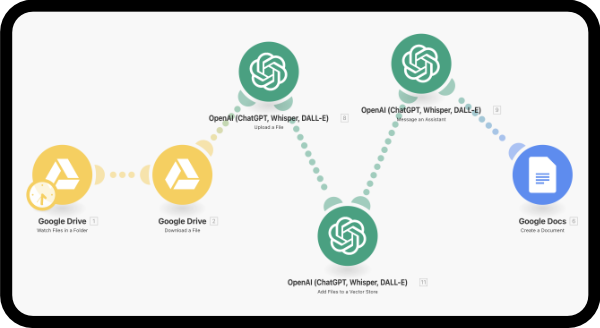
Many of these examples can be implemented with an automation platform such as Make, connected to an AI assistant and your existing tools.

These document and communication workflows apply across many organisations. Explore the examples below, then choose a function or sector for more specific ideas.
For workflows involving several specialised roles, explore multi-agent systems with review and approval steps.

Use case 01

Automated document summarisation

The problem: Reading large volumes of documents and long messages takes time.

The solution: Use an automation workflow to send incoming text to an AI assistant and return a summary at the level of detail you need.

Example workflow:

  • Trigger the workflow when a document arrives in Google Drive or a new email is received.
  • Send the content to an AI assistant.
  • Generate a summary and return it to the automation platform.
  • Save the summary in a document or send it to your inbox.
Automated document summarisation

Use case 02

Automated document translation

The problem: Translating large numbers of documents slows down your work.

The solution: Use an AI assistant to translate documents, with instructions about context, terminology and the intended audience.

Example workflow:

  • Trigger the workflow when a document is added to a Google Drive folder.
  • Send the document to an AI assistant.
  • Extract the text.
  • Translate the text and return it to the automation platform.
  • Create a PDF containing the translated content.
  • Save the new file in another Drive folder.
Automated document translation

Use case 03

Document classification and organisation

The problem: Large document collections make it difficult to find the right information quickly.

The solution: Generate searchable keywords and organise documents into the appropriate folders.

Example workflow:

  • Trigger the workflow when a new document is saved.
  • Send its content to an AI assistant.
  • Analyse the document.
  • Generate keywords and save them in a spreadsheet or database.
  • Alternatively, classify the document and move it to the appropriate folder.

Use case 04

Data extraction and transformation

The problem: Manually reviewing documents and images to extract key information is time-consuming.

The solution: Extract relevant information automatically and transform it into the format your systems need.

Example workflow:

  • Trigger the workflow when a document, image or PDF arrives.
  • Send it to an AI assistant.
  • Extract text, using optical character recognition (OCR) where needed.
  • Identify key fields such as dates, amounts, names and reference numbers.
  • Transform or reformat the data.
  • Send the results to a spreadsheet or business system.

Use case 05

Automated email and message replies

The problem: High message volumes make it difficult to respond quickly and consistently.

The solution: Draft or send relevant replies for common requests using predefined rules.

Example workflow:

  • Trigger the workflow when a new message arrives, for example in Gmail.
  • Send the content to an AI assistant.
  • Identify the request type.
  • Draft a reply when the request matches a supported case.
  • Track the conversation in your email management system.

Use case 06

Chat with documents and draft business proposals

The problem: Teams need to find answers in specifications and reuse that information when preparing proposals.

The solution: Connect a document-based assistant to your proposal workflow to answer questions and prepare draft sections.

Example workflow:

  • Provide specifications or a project brief.
  • Extract keywords to classify the document and project type.
  • Summarise the requirements and project scope.
  • Ask questions about the supplied documents.
  • Draft proposal sections using your company information, context and tone.
  • Optionally prepare a personalised video introduction for review.

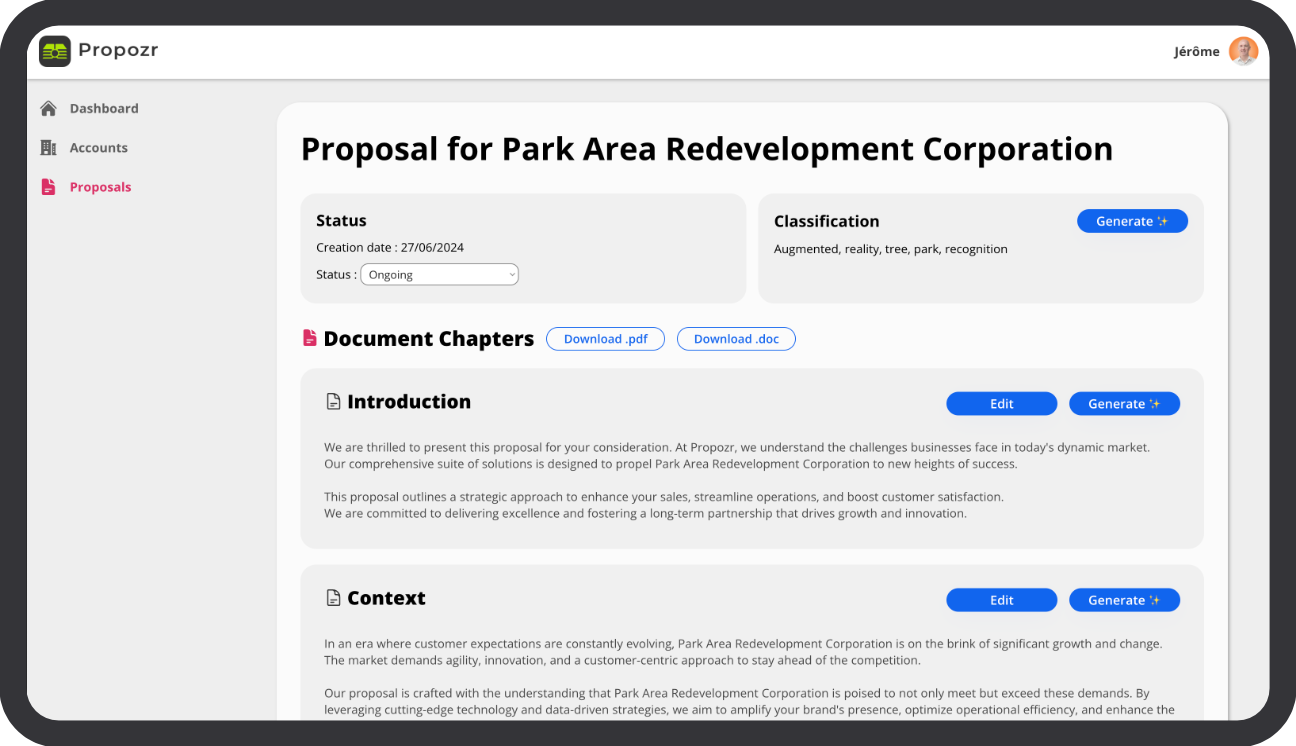
The Propozr example shown below illustrates document-based proposal generation. Review generated content against the source documents before using it.

Chat with documents and draft business proposals

Discuss your AI automation opportunities

Tell us about your current process. We can help identify a useful first use case, define the workflow and put it into practice.